
Stop Crying About Your Ratios
You know that guy in every affiliate chat. Posts his stats, complains his ratio dropped from 1/30 to 1/100, says the offer died, the network is scrubbing him, the traffic source is garbage. Everyone nods. Nobody asks the obvious question.
How many of those clicks were even human?
I checked mine last week. 80% were bots. Not low-quality traffic. Bots. Automated requests that hit my link, did nothing, and left. If I was just reading my dashboard I'd have no clue — it'd look like bad ratios on good traffic.
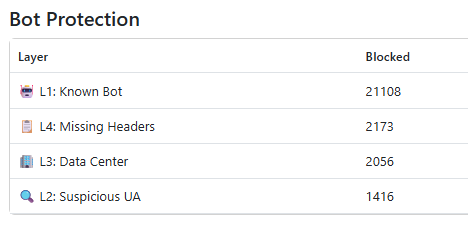
So before we keep comparing numbers in chats, maybe figure out what we're actually counting first.
You don't need to pay for this
There are services that charge hundreds a month to filter bot traffic. If all you want is to stop counting bots and start seeing real numbers, you don't need any of that.
Cloudflare Workers is free up to 100,000 requests a day. It's a small JavaScript script that runs in front of your landing page — every request hits it first, you check it, decide what to do with it. Takes an afternoon to set up.
Here's exactly what to put in it.
The worker skeleton
Create a new Worker in your Cloudflare dashboard, paste this, point it at your LP:
const YOUR_LP = 'https://your-landing-page.com';
const SAFE_URL = 'https://google.com'; // where bots go

export default {
  async fetch(request) {
    const ua = request.headers.get('User-Agent') || '';

    if (isKnownBot(ua))           return Response.redirect(SAFE_URL, 302);
    if (isSuspiciousUA(ua))       return Response.redirect(SAFE_URL, 302);
    if (isDatacenterASN(request)) return Response.redirect(SAFE_URL, 302);
    if (missingHeaders(request))  return Response.redirect(SAFE_URL, 302);

    return fetch(YOUR_LP, request);
  }
};
Now the four functions that power it.
L1: Known bot User Agents
The dumbest bots don't even try to hide. Social platforms fetch your link the second it's posted to generate a preview. Search engines crawl it. Scrapers, headless browsers, monitoring tools — they all identify themselves in their User-Agent string.
function isKnownBot(ua) {
  const bots = [
    // Social crawlers
    /facebookexternalhit/i, /Twitterbot/i, /LinkedInBot/i,
    /TelegramBot/i, /WhatsApp/i, /Discordbot/i,
    // Search engines
    /Googlebot/i, /bingbot/i, /YandexBot/i, /AhrefsBot/i,
    // Automation & headless
    /HeadlessChrome/i, /Selenium/i, /Puppeteer/i, /PhantomJS/i,
    // Raw HTTP tools
    /curl/i, /wget/i, /python-requests/i, /Go-http-client/i,
    // Generic
    /bot\b/i, /crawler/i, /spider/i, /scraper/i,
  ];
  return bots.some(p => p.test(ua));
}
This single check removes a massive chunk of garbage on the first pass.
L2: Suspicious User Agent
Beyond the ones that announce themselves, a lot of bots send UAs that just look wrong. Real browsers always send a long string — OS, version, engine. Nobody browses from a 10-character UA or sends literally Mozilla/5.0 with nothing after it.
function isSuspiciousUA(ua) {
  if (!ua || ua.length < 20) return true;
  if (!/Mozilla|Opera/i.test(ua)) return true;
  if (/^Mozilla\/5\.0$/.test(ua.trim())) return true;
  return false;
}
Three lines. Catches a surprising amount of lazy bot traffic.
L3: Datacenter ASN
Every IP on the internet belongs to an organization — your home internet provider, a mobile carrier, or a cloud company. Real users are on ISP or mobile networks. Bots run on rented servers — AWS, Google Cloud, DigitalOcean, Hetzner.
Cloudflare gives you the ASN of every request automatically, no extra API needed. You just check it:
function isDatacenterASN(request) {
  const asn = request.cf?.asn;
  const org = (request.cf?.asOrganization || '').toLowerCase();

  const datacenterASNs = new Set([
    14618, 16509, 7224,   // Amazon AWS
    15169, 396982,        // Google Cloud
    8075,                 // Microsoft Azure
    14061,                // DigitalOcean
    20473,                // Vultr
    16276,                // OVH
    24940,                // Hetzner
    63949,                // Linode
  ]);

  if (datacenterASNs.has(asn)) return true;

  const keywords = ['amazon','google','microsoft','digitalocean',
                    'hosting','server','cloud','datacenter','hetzner'];
  return keywords.some(k => org.includes(k));
}
This catches bots running real Chrome on cloud servers — the ones that passed L1 and L2 just fine.
L4: Missing headers
Every real browser sends an Accept-Language header automatically. en-US,en;q=0.9 or whatever your system language is. You can't turn it off. Bots making raw HTTP requests often skip it entirely.
function missingHeaders(request) {
  return !request.headers.get('Accept-Language');
}
One line. If there's no language header, it's not a browser.
Deploy it
Go to workers.cloudflare.com, create a new Worker, paste all the code, set your LP URL and your safe redirect URL. Then go to your domain's DNS in Cloudflare and route traffic through the Worker.
Free plan. No credit card. 100k requests a day.
Now when you open your tracker and see 500 clicks, those are 500 requests that passed four filters. Compare to what your traffic source reports. The gap is bots.
Mine was 80% last week. Yours is probably not zero either.
I'm not saying your offer isn't dead. Maybe it is. But at least know what you're measuring before you decide that.
Want to use this?
Download the kit — worker.js + lp.htmlTwo files. Open both, change 2 lines in each, deploy. That's it.